Business Intelligence for Joinery & Cabinetmaking

Know which jobs make you money,before you quote the next one.

JoineryHub connects to the joinery, CAD and payroll software NZ and Australian workshops already use, and turns the jobs, hours and wages you record into clear answers on profit, productivity and growth. Ask questions in plain English, and let approval-first automations remove the re-typing.

JoineryHub
JoineryHub overview dashboard showing income, estimated profit, margin, ROI and profit per labour hour

Demo shown with Empower, Crystal Payroll and StairBiz connected. JoineryHub works with many more systems.

Integrates with the software you already use

JoineryHub works with popular New Zealand and Australian joinery, CAD/CAM, accounting and payroll systems, so you keep the tools you have.

  • Empower
  • Jim2
  • KIM
  • Rees
  • Microvellum
  • CabinetVision
  • Pro100
  • Crystal Payroll
  • Smartsheet
See all integrations
What JoineryHub does

One hub for the numbers that run your workshop

Your jobs are in one system, your wages in another, your drawings in a third. JoineryHub connects them, shows you what they mean, and takes the re-typing off your team.

Connect

Joins your systems

Links your job management, CAD/CAM, accounting and payroll software, so each fact is recorded once.

Understand

Shows what is really happening

Profit by job, wages against work done, delivery, customers and capacity, with an AI Assistant to answer your questions.

Automate

Removes the re-typing

Jobs from emailed PDFs and spreadsheets, and hours into payroll, move across only after a person approves.

See it in action

JoineryHub in under three minutes

A narrated walkthrough of the dashboards, the AI Assistant and the automations, using sample data.

Prefer YouTube?Watch it there.

Straight answers

The questions every owner asks, answered

Most joinery businesses have the data. What they lack is the time to turn it into decisions. JoineryHub does that for you.

Which jobs actually make us money?

Income, estimated profit, margin and profit per labour hour for every job type, product, customer and salesperson.

Are our wages covered by the work we finish?

Return on wages, your break-even point and how many paid hours never reach a job.

How do we grow profit by 20%?

Set a target and JoineryHub works out where it can come from, using your own jobs, margins and capacity.

Are we delivering on time?

On-time delivery, lead times, overdue work and delivered-but-not-invoiced jobs, all in one view.

Who do we depend on?

Customer concentration, new versus returning customers, and a scorecard for each salesperson.

Which work should we take on next?

Tick the job types you could take against your labour hours and see the profit before you commit.

Features

Everything in one clear view

Profit

Know which jobs make you money

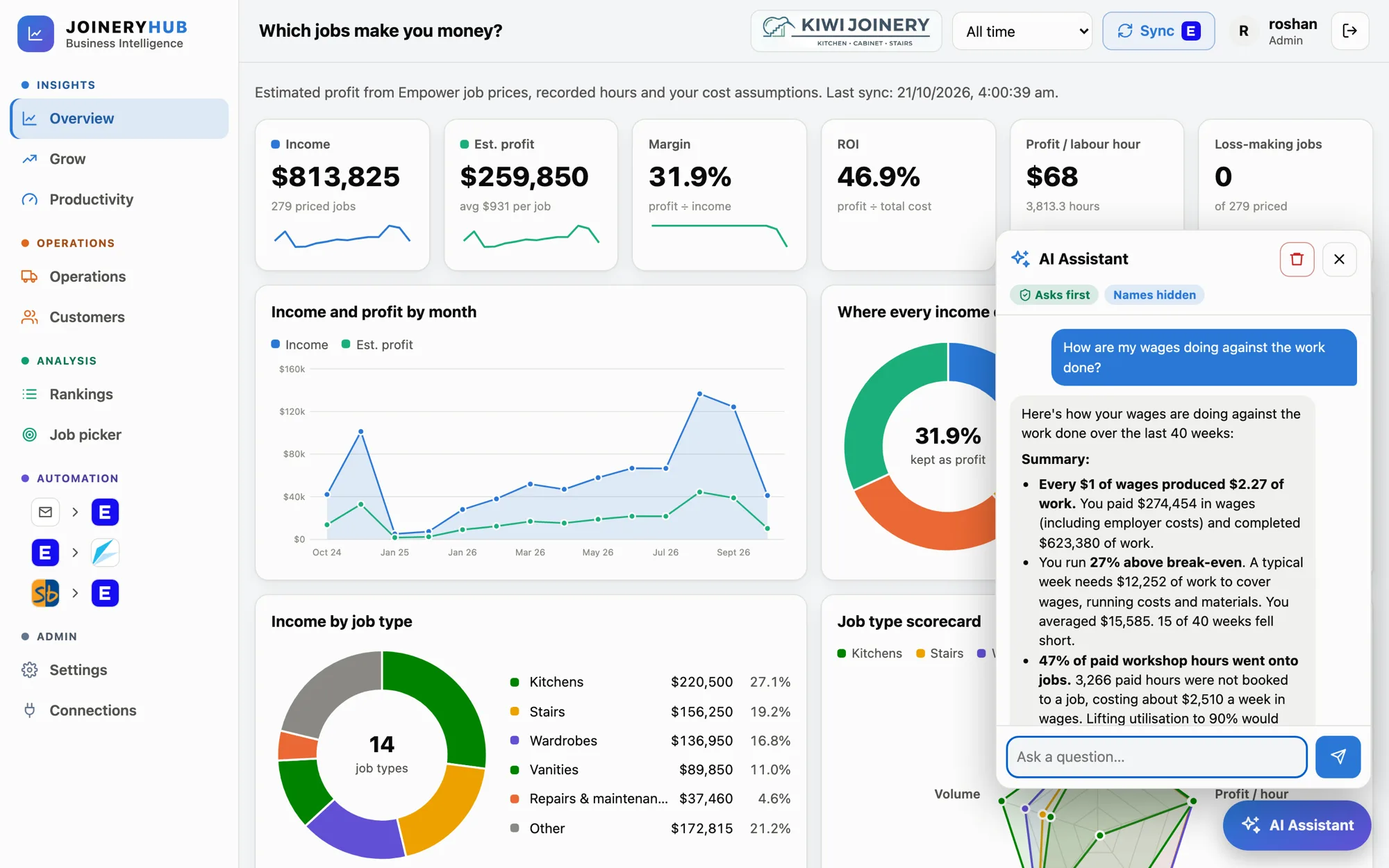
The Overview turns every priced job into a clear picture of income, estimated profit and margin, so you can see what to chase and what to reprice.

  • Income, estimated profit, margin, ROI and profit per labour hour at a glance
  • Where every income dollar goes: labour, overhead, materials and profit
  • Job-type scorecard that shows which kinds of work earn the most per hour
  • Loss-making jobs flagged so they never hide in the average
JoineryHub
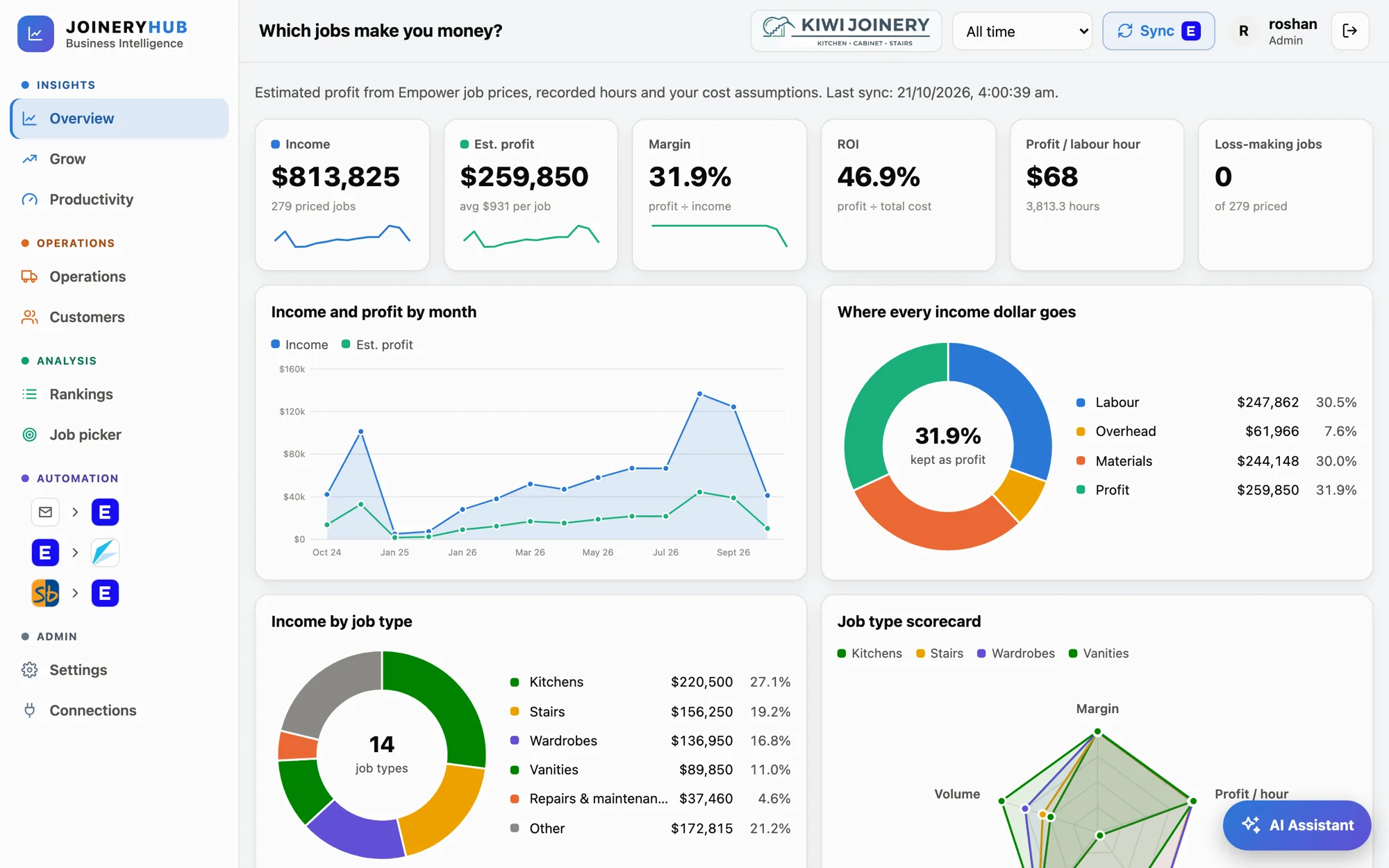
JoineryHub Overview showing income, profit, margin, income and profit by month, and where every income dollar goes
Productivity

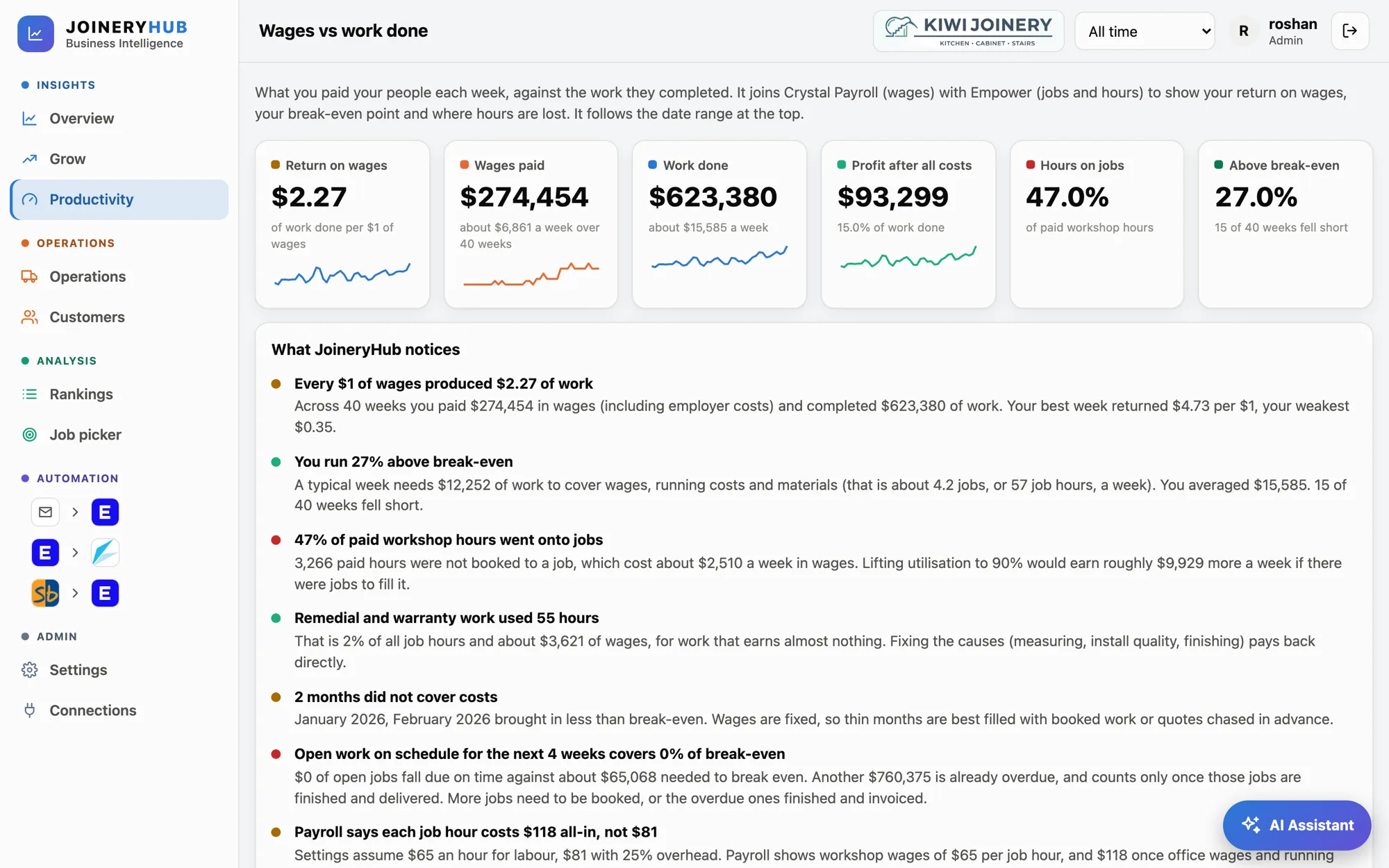
Wages versus work done, week by week

JoineryHub joins payroll wages with the jobs you complete, then tells you in plain English what it notices.

  • Return on wages: how much work each $1 of wages produces
  • Break-even point, and how many weeks fell short of it
  • Paid workshop hours that were never booked to a job
  • Written findings you can read in a minute and act on
JoineryHub
JoineryHub Productivity page showing return on wages, wages paid, work done and written findings
Grow

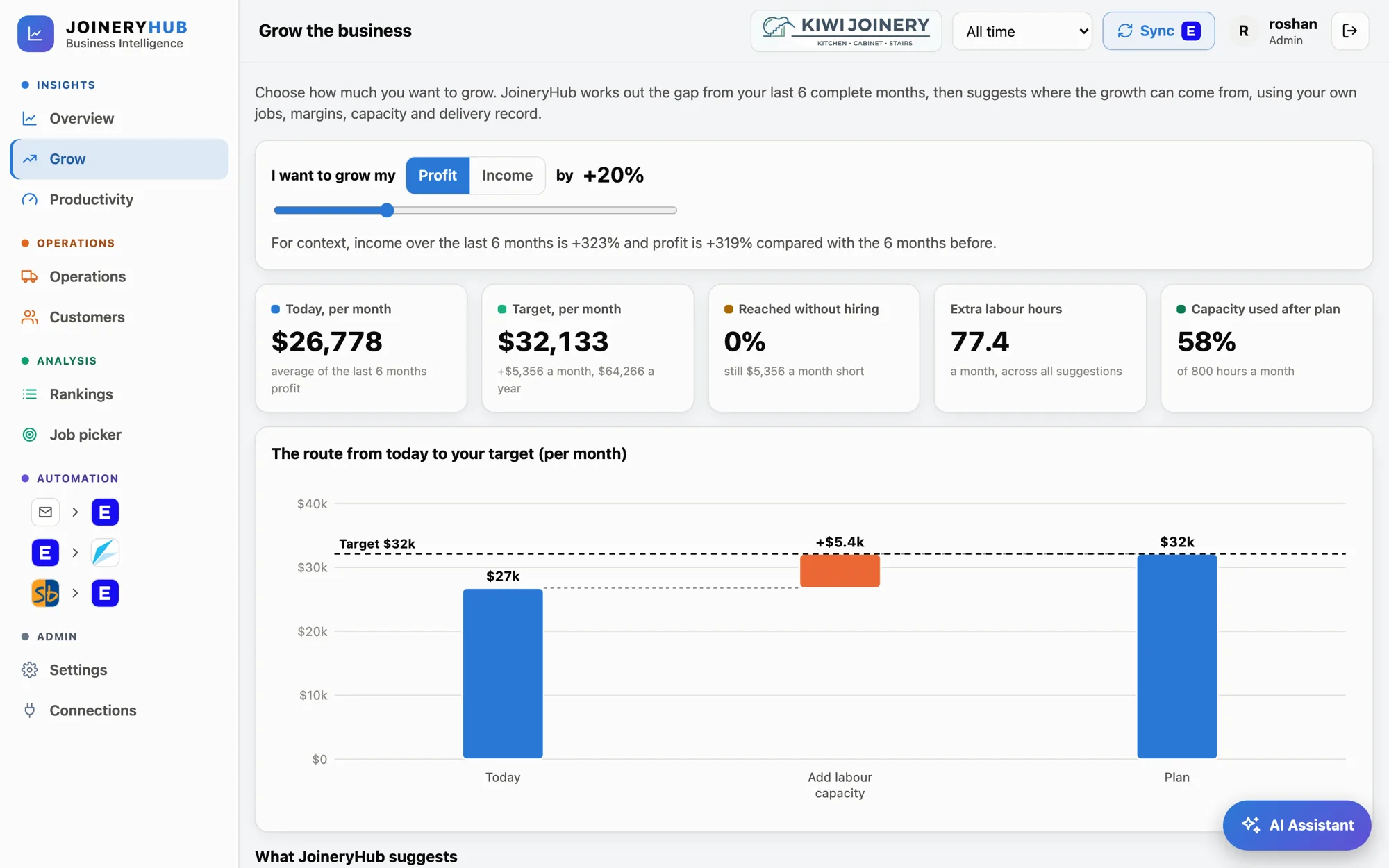
A planner for the next step up

Choose profit or income, set a target and see the route from where you are today to where you want to be.

  • Suggestions drawn from your own history, not generic advice
  • Quote to the real hours, reprice thin-margin work, fill spare capacity
  • Swap low-yield work for high-yield work
  • Shows when hiring is the only way to reach the target
JoineryHub
JoineryHub Grow planner showing the route from today's monthly profit to a target
Operations

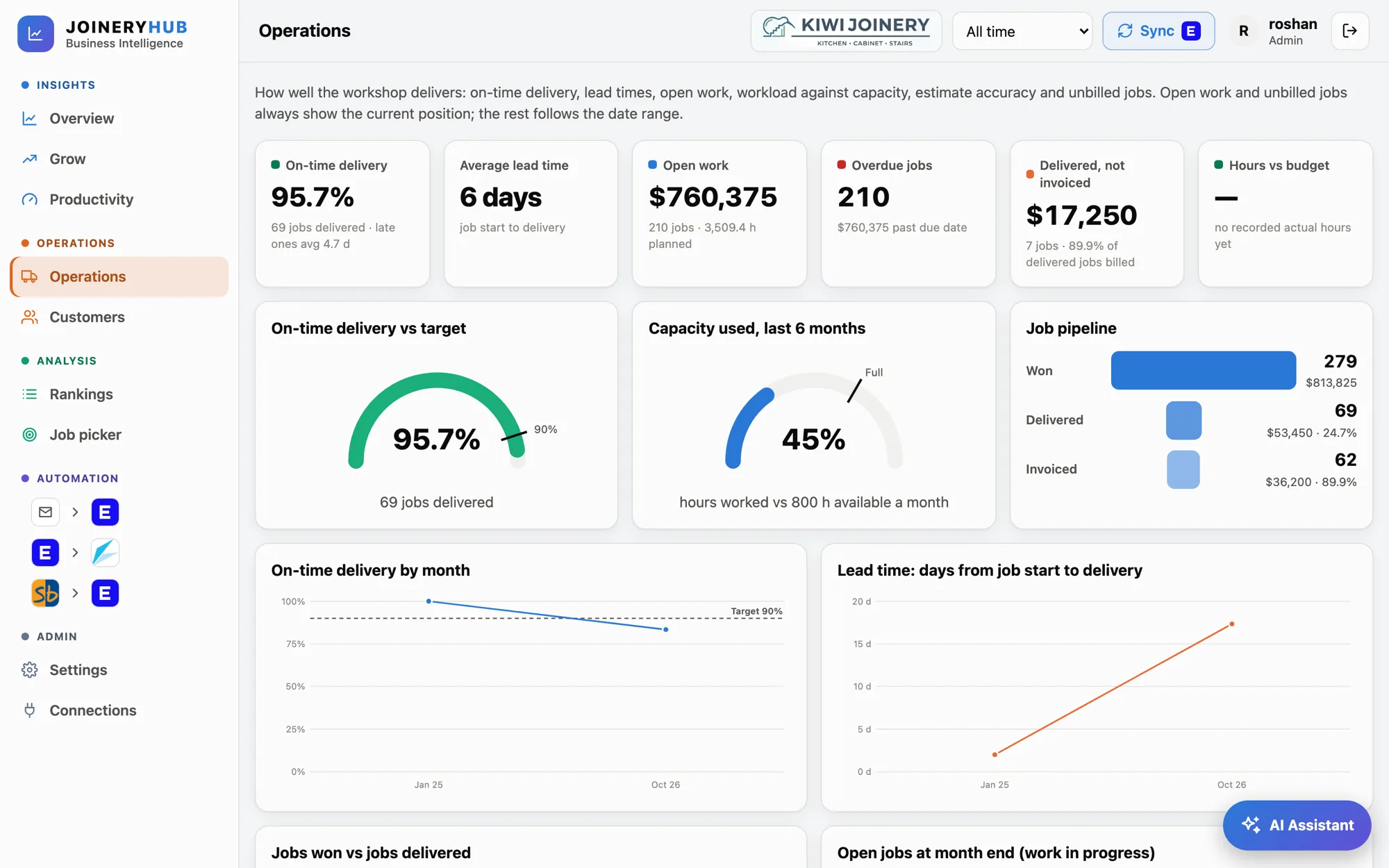
See how well the workshop delivers

Open work, overdue jobs and workload against capacity, in one place instead of five spreadsheets.

  • On-time delivery against your target, and average lead time
  • Open and overdue work, with the dollar value attached
  • Capacity used against the labour hours you have available
  • Delivered but not yet invoiced, so billing never slips
JoineryHub
JoineryHub Operations page showing on-time delivery, capacity used and job pipeline
Customers & team

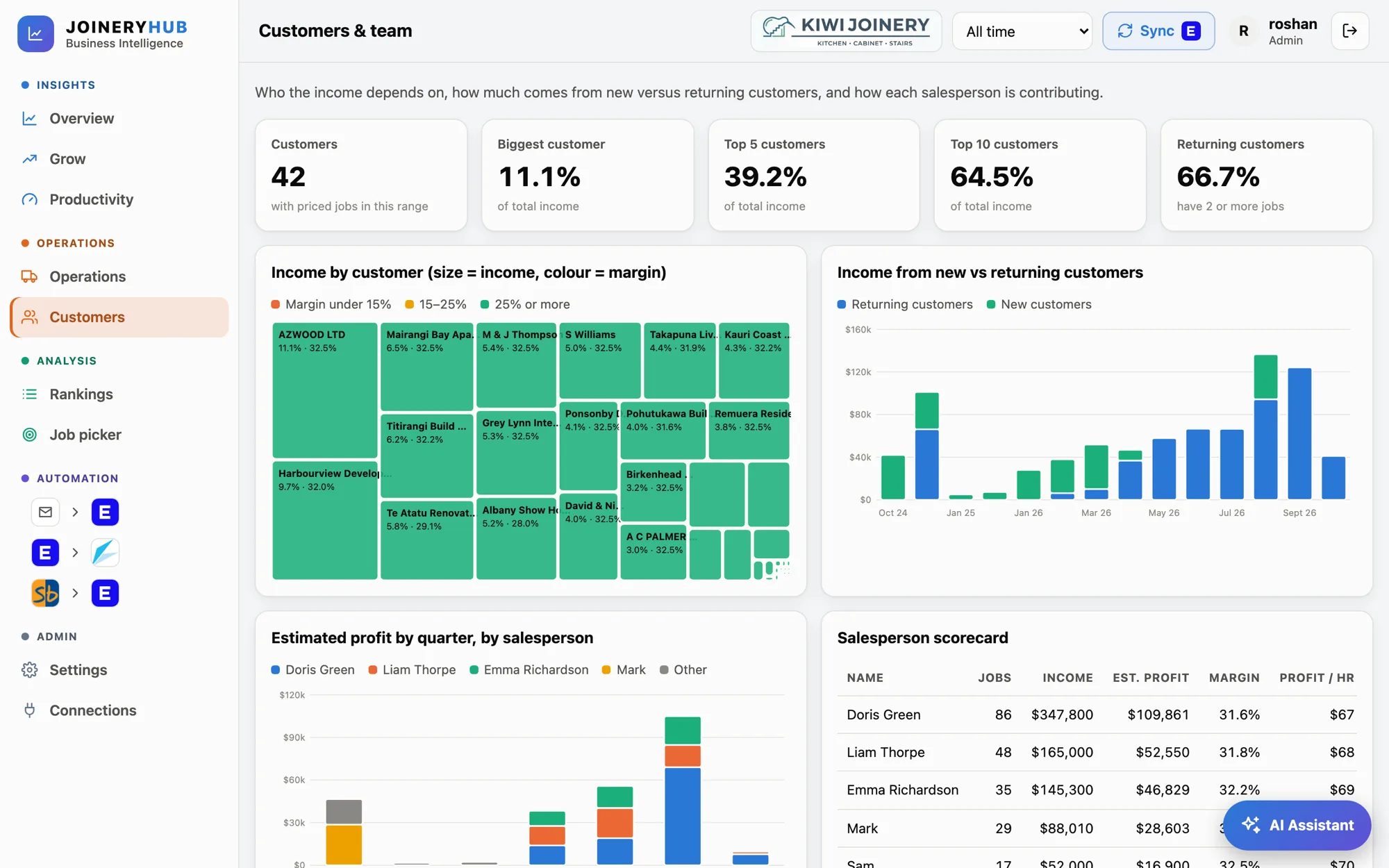
Understand who your income depends on

Spot concentration risk early, see how much comes from repeat customers, and know how each salesperson contributes.

  • Income by customer, coloured by margin so weak accounts stand out
  • Top 5 and top 10 customer share of income
  • New versus returning customer income over time
  • Salesperson scorecard with jobs, income, profit and margin
JoineryHub
JoineryHub Customers page showing income by customer, new versus returning income and a salesperson scorecard
Analysis

Decide what to take on next

Rank your work, then test a mix of jobs against the labour hours you actually have.

JoineryHub
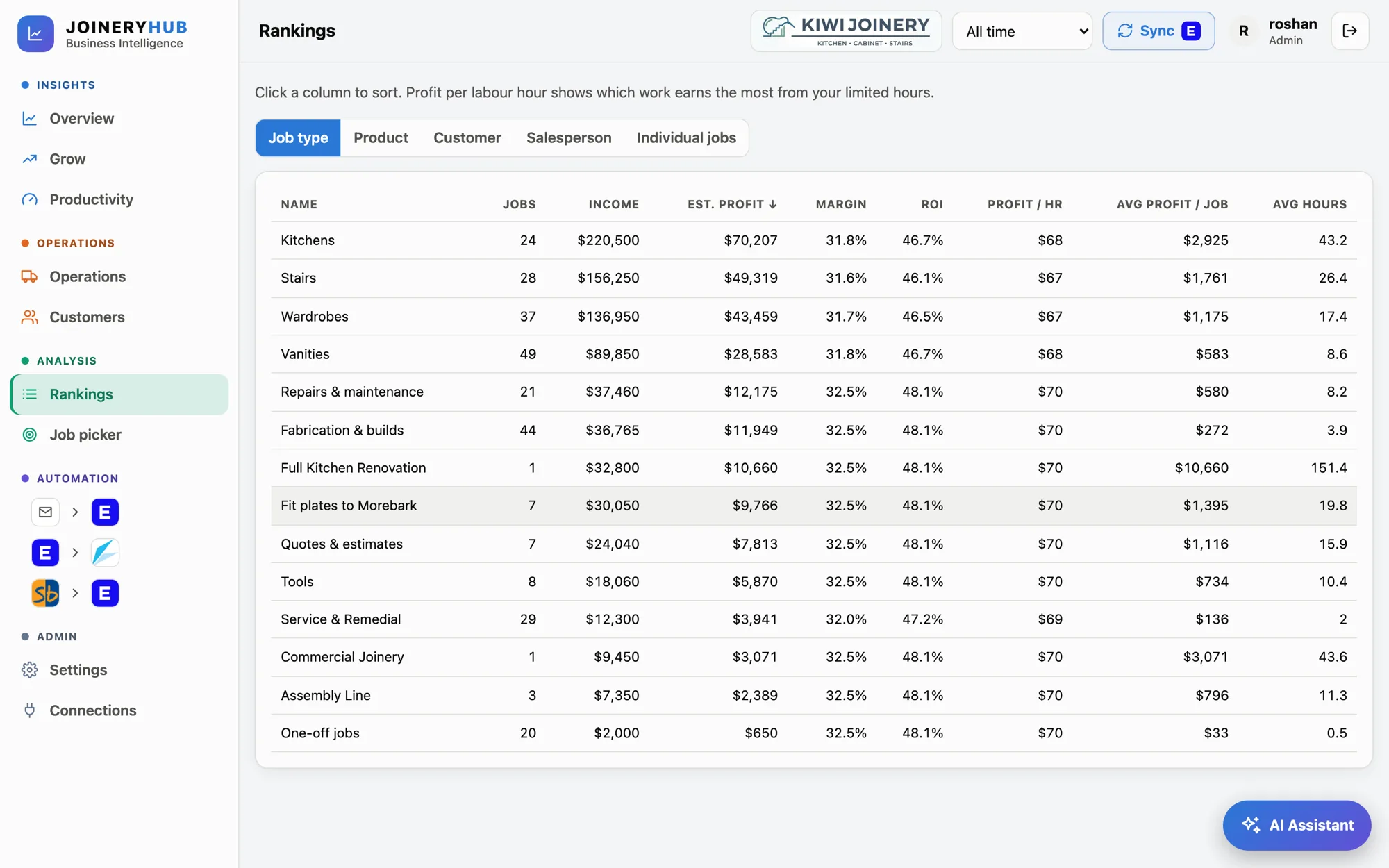
JoineryHub Rankings table sorting job types by estimated profit, margin and profit per hour

Rankings

Sort by job type, product, customer, salesperson or individual job. Profit per labour hour shows which work earns the most from your limited hours.

JoineryHub
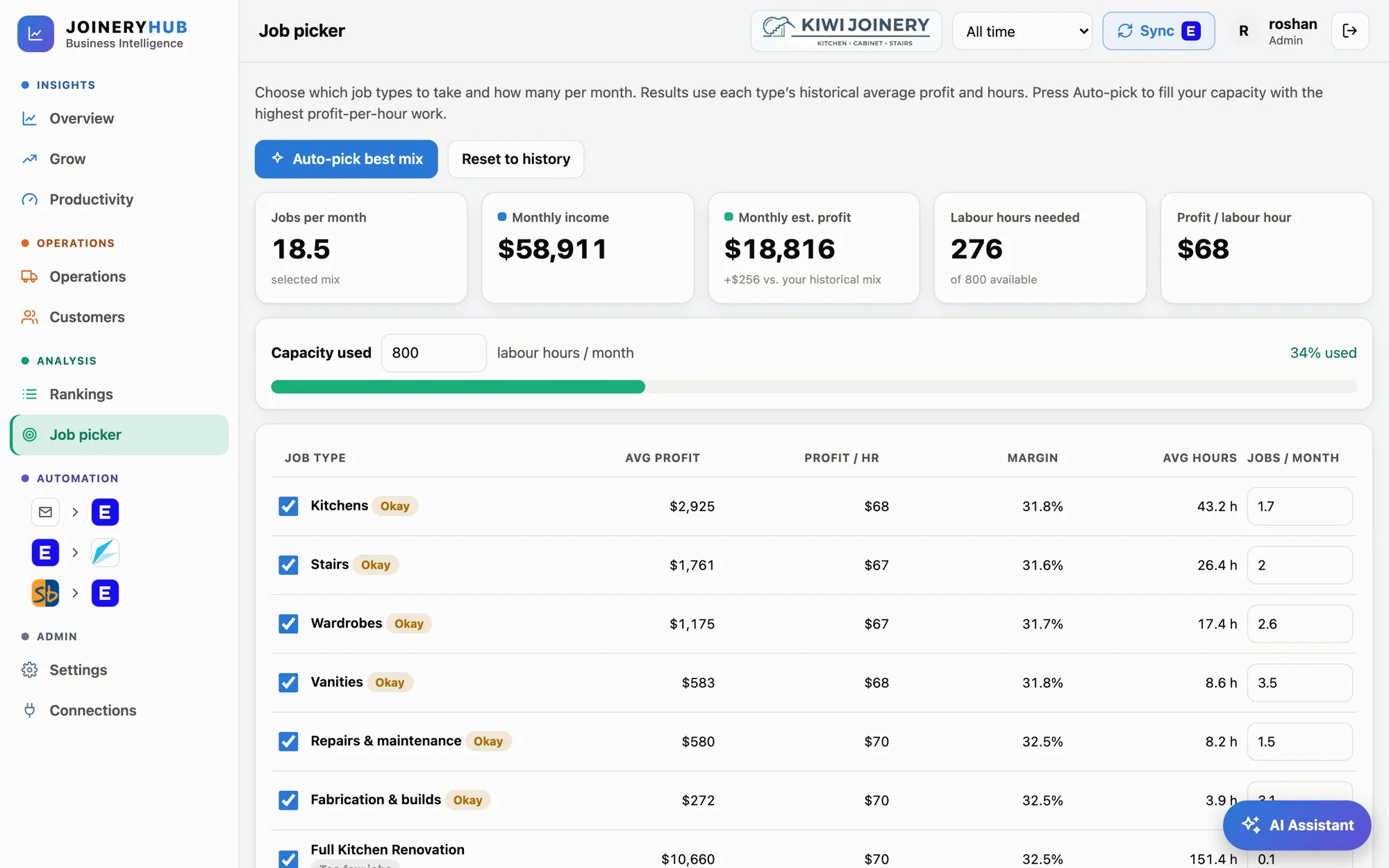
JoineryHub Job picker with an auto-pick best mix button and capacity used against 800 labour hours

Job picker

Tick the job types you could take and set how many a month. See income, profit and hours needed, or let Auto-pick fill your capacity with the highest profit-per-hour mix.

AI Assistant

Just ask. Get answers from your own numbers.

The AI Assistant sits in the corner of every page. Ask how wages are doing against work done, which customers make the most profit, or what is waiting for approval, and it answers in plain English from your live data.

  • Ask follow-up questions, no reports to build
  • Looks things up and explains them, and asks first before approving anything
  • Names hidden by default: customers, staff and salespeople are swapped for codes, and individual pay is never sent
  • Admins choose the level: Full detail, Names hidden or Strict
JoineryHub
JoineryHub AI Assistant answering how wages are doing against the work done, with Asks first and Names hidden labels
Automation

Stop re-typing. Keep control.

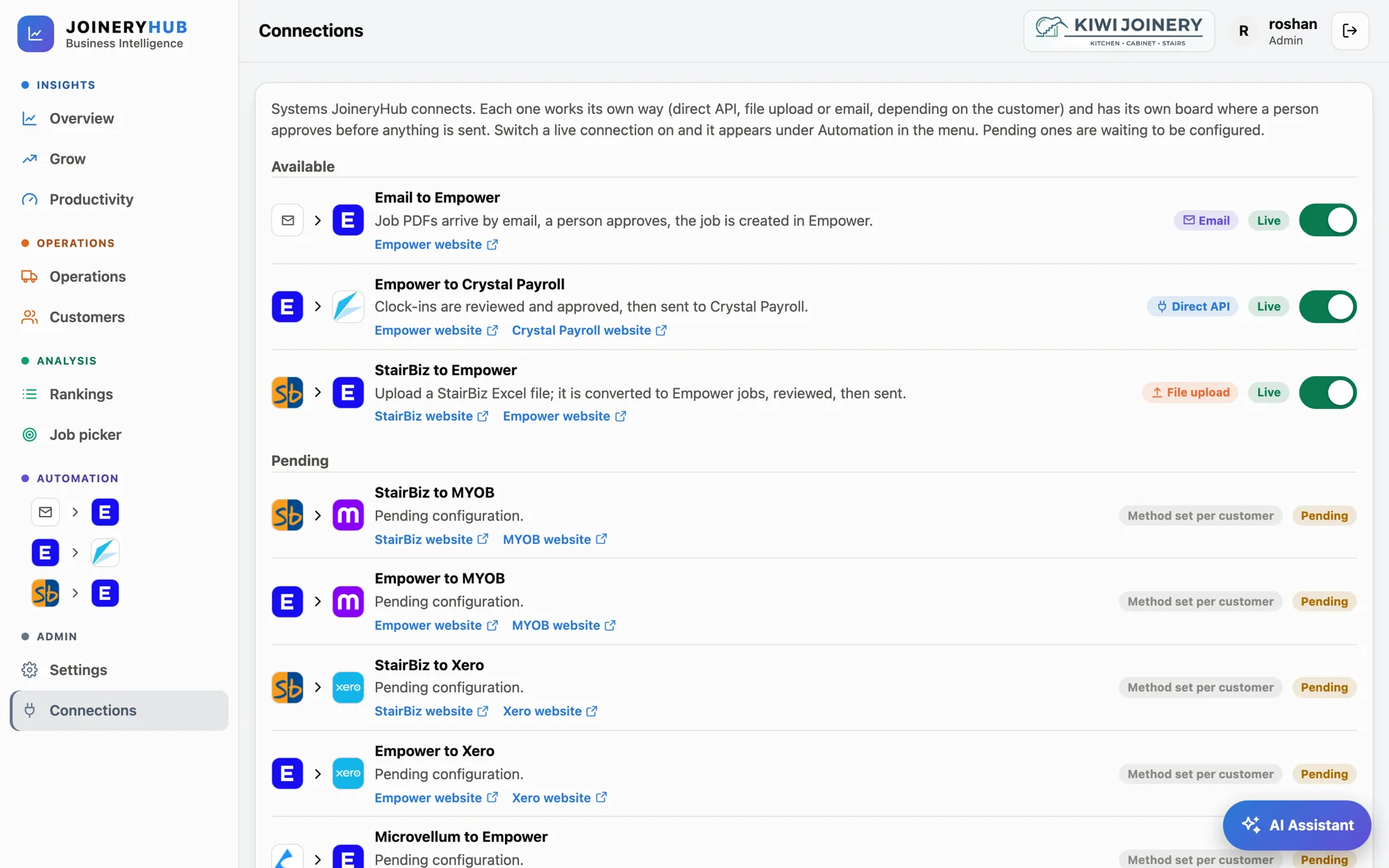
Each connection has its own board. Work moves from left to right, and a person approves before anything is sent. These three are switched on in our demo; the others are set up for each customer.

Email

Email to Empower

Job PDFs arrive by email and are read automatically. A person checks each one and approves it, then the job is created in Empower.

Direct API

Empower to Crystal Payroll

Clock-ins are imported from Empower and reviewed by a person. Only approved hours move on to Crystal Payroll.

File upload

StairBiz to Empower

Upload a StairBiz spreadsheet. It is converted into Empower jobs, reviewed, then sent once approved.

JoineryHub
JoineryHub Connections page listing the connections available, with Email to Empower, Empower to Crystal Payroll and StairBiz to Empower switched on in the demo

The demo environment, with three connections switched on. Many more joinery, CAD and payroll systems are listed, each configured for your business.

Integrations

Works with the software you already run

JoineryHub is not tied to one system. It integrates with the joinery, CAD/CAM, accounting and payroll software popular across New Zealand and Australia. Our demo shows Empower, Crystal Payroll and StairBiz.

Job management & ERP

Where your jobs, quotes and hours live.

  • EmpowerIn the demo
  • Jim2
  • KIM
  • RRees

Design & CAD/CAM

From the drawing to the job, without re-keying.

  • Microvellum
  • CabinetVision
  • Pro100

Accounting, payroll & stock

Wages, invoices and inventory, joined to the jobs.

  • Crystal PayrollIn the demo
  • Smartsheet

Using something that is not listed? Ask us. Each connection is set up for your business.

Product names and logos belong to their respective owners and are shown only to identify the systems JoineryHub works with.

How it works

Up and running in three steps

  1. 1

    Connect

    We link JoineryHub to your job-management software, such as Empower, Jim2, KIM or WorkGuru, and to the CAD, accounting and payroll tools around it.

  2. 2

    See

    Your jobs, hours and wages appear as clear dashboards, refreshed automatically every day.

  3. 3

    Act

    Reprice, plan, take on the right work and let the automations remove the re-typing.

Built with care

Your data, your control

A person always approves

Nothing is created in your job system or sent to payroll until someone on your team has reviewed and approved it.

Sign-in and roles

Only people you add can sign in, and each has a role. Admin tools, payroll and settings are limited to admins.

You control what the AI sees

By default customer, staff and salesperson names are swapped for codes before a question is answered, and individual pay is never sent.

Audit trail

Changes to connections, settings and approvals are recorded so you can see who did what.

FAQ

Common questions

Which software does JoineryHub work with?

It is not tied to one system. JoineryHub integrates with popular NZ and Australian joinery and job-management software, CAD/CAM, accounting and payroll systems, such as Empower, Jim2, Microvellum, imos, CabinetVision, Xero, MYOB and Crystal Payroll. Our demo shows Empower, Crystal Payroll and StairBiz. Tell us what you use and we will confirm how it connects.

Where do the profit figures come from?

Profit is an estimate built from your job prices, the hours recorded and the cost assumptions you set, such as labour rate and overhead. You can change those assumptions at any time.

Does JoineryHub change anything in my systems on its own?

No. The dashboards only read your data. The automations create or send anything only after a person has reviewed and approved it.

Is the AI Assistant optional, and is my data safe with it?

Admins choose how much the assistant can see: Full detail, Names hidden (the default) or Strict, which also removes all payroll and timesheet data. The assistant can look things up and explain them, and it asks first before approving anything.

How much does it cost, and how long does setup take?

It depends on the systems you use and how many connections you want live. Book a demo and we will give you a straight answer for your business.

Can my team use it on a phone or tablet?

Yes. JoineryHub runs in the browser and adapts to phone and tablet screens, so the numbers are available on the shop floor or on site.

See JoineryHub with your own jobs

Book a short demo. We will walk through the dashboards, the AI Assistant and the automations, and show what it would look like on your own data and the software you use.

Or message us on WhatsApp or email info@pminternational.co.nz.

Screenshots show JoineryHub with sample data, connected to Empower, Crystal Payroll and StairBiz for demonstration. Profit figures are estimates based on job prices, recorded hours and the cost assumptions you set. JoineryHub is a product of PM International Consulting.